Find your way around fynk
A short tour of the fynk interface: the sidebar, Create, global search, Inbox, favourites and account settings.
Written By Sebastian
Last updated About 2 hours ago
This article shows where to find everything in fynk.
Available on all plans
Home and your landing page
When you log in from app.fynk.com or the login page, you land on Home. If you open a link or bookmark to a document or dashboard while logged out, fynk takes you back to that page after login. An old dashboard bookmark or a reopened browser tab can therefore take you straight to a dashboard.
The sidebar
The top bar
Search: find any document by name, parties or text. Switch on AI mode to search in plain language. See Search and AI search.
Create: start a new document, template or import.
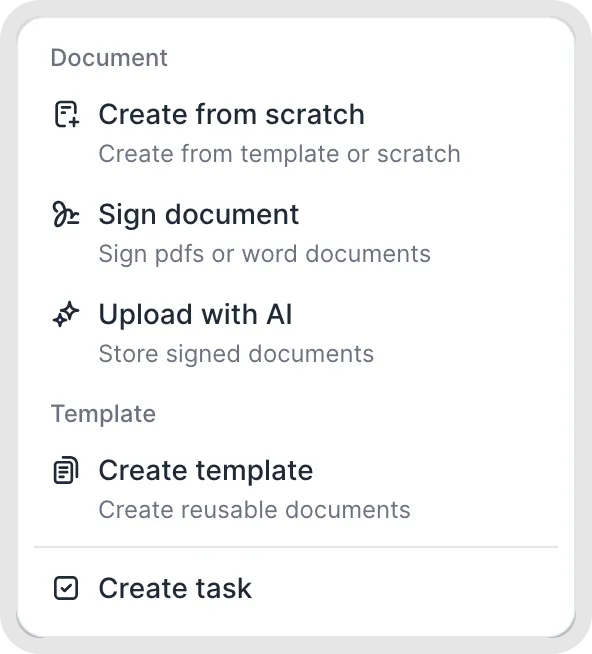
Choose what to create from the Create menu.
Inside a document
Document name: click the name to rename the document.
Header: the document's stage, the main actions (such as Invite or Start signing) and the … menu with revisions, download, archive and more.
Right-hand panel: icons for document details, metadata, dates and deadlines, discussions, notifications and tasks, checkpoints and playbooks.
Settings
Account Settings (Owners and Admins): users, teams, parties, document types, metadata, playbooks, branding and more. See Account settings overview.
User settings: your profile, password, two-factor authentication, notification preferences and calendar feeds.
Click your account name in the top-left corner to switch between fynk accounts or the cogwheel icon next to your account name to enter the account settings.
Owners and Admins can hide the onboarding steps for all users in Account settings → General.
Help
Click the ? icon in the top-right corner to open the help center or chat with us. See Get help and keep learning.
Related articles
Was this helpful?
Still need help? Ask the team